Build an ESP32-CAM Spy Car You Can Drive From Your Phone
Stream live video from an ESP32-CAM car and drive it from your phone over Wi-Fi with RoboLink, the custom Arduino and ESP32 controller app.

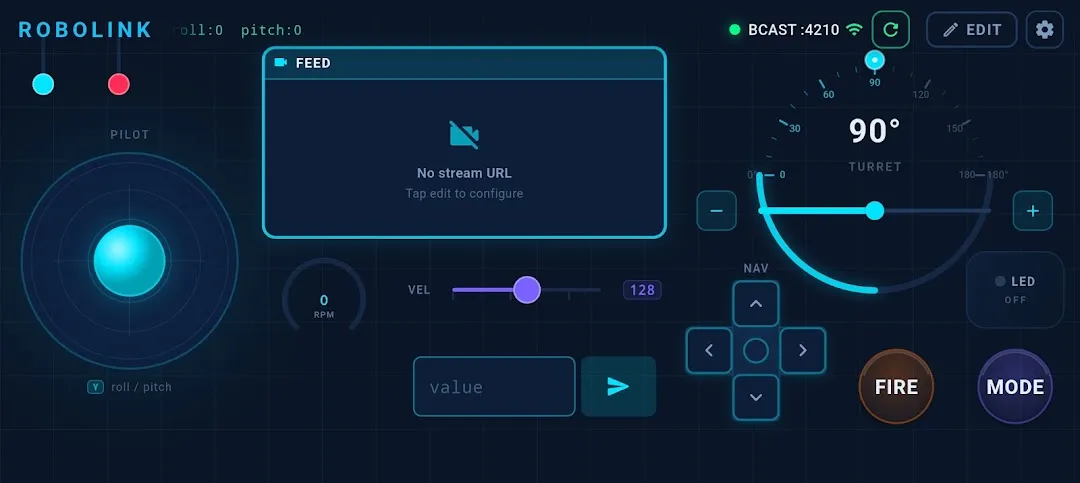
An ESP32-CAM is one of the cheapest ways to give a robot eyes. Put one on a small car chassis and you have a surveillance car you can drive around the house while watching a live feed. The tricky part is usually the phone side: most tutorials leave you with a bare web page and a few buttons. RoboLink gives you a real controller instead.
How it fits together
- The ESP32-CAM streams MJPEG video over Wi-Fi.
- Your car's microcontroller drives the motors through a motor driver.
- RoboLink on your phone shows the live camera feed and sends joystick and button input over Wi-Fi UDP, which keeps latency low for real-time driving.
Three steps to drive
- Upload the library. Install the open-source RoboLink library from the Arduino Library Manager and flash the example sketch to your board.
- Connect. Join the ESP32's access point or your local network and connect from the app over Wi-Fi UDP, or pair over Bluetooth Classic (HC-05, HC-06 or ESP32).
- Customise and drive. Start from the RC Car preset, then drag in a camera widget, joystick, sliders or toggles until the layout fits your car.
Why a custom layout matters
Every robot is different. RoboLink's drag-and-drop editor lets you add, resize and position joysticks, buttons, sliders, toggles, D-pads, XY pads, gauges, triggers and live camera feeds on a grid, then save the layout and switch between them instantly. The joystick supports dead zones, output ranges and axis inversion, so the same app drives a two-wheel car, a tank chassis or a robotic arm.
Find the full docs and wiring guides at robolink.studio and the source on GitHub.